
Ergonomic laptop stands exist to solve one problem: laptops sit too low, forcing your neck into a downward hunch for hours. The Lifelong Extra Tall 20″ Riser takes my best overall spot because its extended height range lets most users raise the screen to true eye level — something shorter stands simply cannot do. For frequent movers, the Nulaxy 360° Rotating Dual Foldable Stand folds flat while keeping a full rotating base, and the Amazon Basics Ergonomic Stand is the clear value pick if you just want a solid ventilated riser under $30. The main tradeoff in this category is between portability and stability: compact folding stands wobble more, while heavy desk-bound risers hold rock steady but never leave the office. Read on for the full breakdown of all 14 stands, including who each one is for and which ones to skip.
Key Takeaways
- Height range separated the winners more than any other spec — only the amazon.com/dp/B08G3YGDJ1?tag=simplifykit-20&ascsubtag=dc-711223″ target=”_blank” rel=”nofollow sponsored noopener”>Lifelong 20″ riser and a few tall adjustable models reached true eye level for average-height users at a standard desk; most sub-$25 stands topped out 2-3 inches too low.
- Folding designs from Nulaxy and the 360° rotating adjustable model carried a clear stability penalty, wobbling under heavy typing — better for occasional use than all-day work.
- Wrist support, found on the LOXP riser and JCZT acrylic stand, changes the ergonomics equation: raising the laptop forces an external keyboard, so wrist rests only matter if you plan to keep typing on the laptop itself.
- The Amazon Basics and Besign LS03 proved that fixed-height aluminum designs under $30 outperform many adjustable stands in the same price bracket on stability and build quality.
- Acrylic (JCZT) and ventilated metal mesh designs ran visibly cooler than solid aluminum plates, which matters for sustained workloads on thermally throttled laptops.
| Adjustable Ergonomic Laptop Stand with Phone Holder, 360° Rotation, Foldable Portable Design for 10-17″ Laptops and Tablets |  | Best for Multitaskers | Height Adjustment: 5.5″ to 7.0″ | Material: Aircraft-grade ABS, silicone pads | Maximum Load: 22 lbs | VIEW LATEST PRICE | See Our Full Breakdown |
| Lamicall Aluminum Laptop Stand for Desk for MacBook Air Pro 10-17.3” |  | Best Overall | Compatibility: Laptops 10-17.3 inches, MacBook, Surface, Dell, HP, ASUS, Acer, Chromebook | Material: Aluminum alloy | Dimensions: 12 x 10 x 2 inches | VIEW LATEST PRICE | See Our Full Breakdown |
| Laptop Stand for Desk (360° Rotating), Aluminum Laptop Riser for 10-16 Inch Laptops | 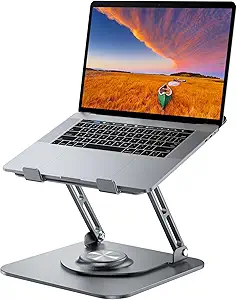 | Best for Collaboration | Material: Aluminum alloy | Max Load: 11 lbs | Height Adjustment: Up to 11.81 inches | VIEW LATEST PRICE | See Our Full Breakdown |
| LOXP Adjustable Laptop Stand for Desk, Portable Airflow Laptop Riser Holder |  | Best Budget Travel Pick | Material: Metal with non-slip pads | Compatibility: Laptops up to 15.6 inches | Form Factor: Tower | VIEW LATEST PRICE | See Our Full Breakdown |
| LOXP Laptop Stand for Desk, Aluminum Laptop Riser with Wrist Support |  | Best for Typing Comfort | Form Factor: Suspended bracket | Elevation: 2.6 inches | Compatibility: Laptops 9.3-17.3 inches, MacBook, Lenovo, Dell, Asus, HP, Chromebook, Samsung | VIEW LATEST PRICE | See Our Full Breakdown |
| Besign LS03 Aluminum Laptop Stand, Ergonomic Detachable Computer Stand |  | Best Fixed-Height Workhorse | Compatibility: 10-15.6 inch laptops | Material: Aluminum alloy | Support Weight: 8.8 lbs (4 kg) | VIEW LATEST PRICE | See Our Full Breakdown |
| Lifelong Aluminum Adjustable Laptop Stand, Extra Tall 20″ Riser | 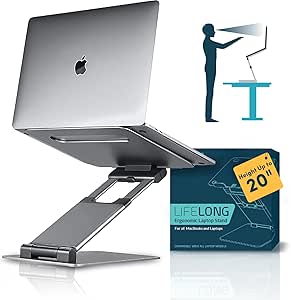 | Best for Tall Desk Setups | Material: Aluminum | Maximum Height: 20 inches | Arm Extension: 13 inches | VIEW LATEST PRICE | See Our Full Breakdown |
| JCZT Clear Acrylic Laptop Stand for Desk with Wrist Rest |  | Best Aesthetic Pick | Material: Acrylic | Height Elevation: 2.7 inches | Supports Devices: Laptops and tablets up to 17 inches | VIEW LATEST PRICE | See Our Full Breakdown |
| Adjustable Laptop Stand for Desk, Metal Laptop Riser Holder |  | Best Cooling-Focused Pick | Material: Metal | Support Weight: Up to 17.6 lbs (8 kg) | Compatibility: Laptops 10-15.6 inches | VIEW LATEST PRICE | See Our Full Breakdown |
| Laptop Stand for Desk, Adjustable Metal Riser Holder |  | Best Budget Adjustable Pick | Material: ABS, aluminum, silicone | Weight Support: 17.6 lbs (8 kg) | Compatibility: Laptops 10-15.6 inches | VIEW LATEST PRICE | See Our Full Breakdown |
| Nulaxy 360° Rotating Ergonomic Laptop Stand for Desk, Dual Foldable Design |  | Best for Screen Sharing | Load Capacity: 22 lbs | Rotation: 360° | Adjustability: Height and angle adjustable | VIEW LATEST PRICE | See Our Full Breakdown |
| Nulaxy Ergonomic Adjustable Laptop Stand for Desk, Dual Foldable Computer Riser with Heat-Vent |  | Best for Heavy-Duty Daily Use | Max Load: 22 lbs (10 kg) | Compatibility: 10-16 inch laptops | Support Mechanism: Dual-rod stability | VIEW LATEST PRICE | See Our Full Breakdown |
| Amazon Basics Ergonomic Laptop Stand, Height Adjustable, Foldable, Ventilated |  | Best Budget Pick | Height Adjustment: Up to 7 inches | Supported Devices: Laptops and tablets 10 to 15.6 inches | Material: Lightweight, rust-resistant aluminum | VIEW LATEST PRICE | See Our Full Breakdown |
| Uncaged Ergonomics Swivel Laptop Stand for Desk, 360 Riser, Arctic Silver |  | Best All-Around Swivel | Material: Metal | Device Size Range: 10 to 15.6 inches | Features: 360° rotation, height/tilt adjustable, foldable, swivel | VIEW LATEST PRICE | See Our Full Breakdown |
| ergonomic laptop stand | Material | Compatibility | Color |
|---|---|---|---|
| Adjustable Ergonomic Laptop St | Aircraft-grade ABS, silicone pads | 10-17" laptops, tablets, smartphones | — |
| Lamicall Aluminum Laptop Stand | Aluminum alloy | Laptops 10-17.3 inches, MacBook, Surface, Dell, HP, ASUS, Acer, Chromebook | Silver |
| Laptop Stand for Desk | Aluminum alloy | 10-16 inch laptops and tablets | Grey |
| LOXP Adjustable Laptop Stand f | Metal with non-slip pads | Laptops up to 15.6 inches | Classic Black |
| LOXP Laptop Stand for Desk | Aluminum with rubber pads | Laptops 9.3-17.3 inches, MacBook, Lenovo, Dell, Asus, HP, Chromebook, Samsung | Black |
| Besign LS03 Aluminum Laptop St | Aluminum alloy | 10-15.6 inch laptops | Silver |
| Lifelong Aluminum Adjustable L | Aluminum | — | Grey |
| JCZT Clear Acrylic Laptop Stan | Acrylic | — | Clear |
| Adjustable Laptop Stand for De | Metal | Laptops 10-15.6 inches | — |
| Laptop Stand for Desk | ABS, aluminum, silicone | Laptops 10-15.6 inches | — |
| Nulaxy 360° Rotating Ergonomic | — | — | Black |
| Nulaxy Ergonomic Adjustable La | Not specified | 10-16 inch laptops | — |
| Amazon Basics Ergonomic Laptop | Lightweight, rust-resistant aluminum | — | — |
| Uncaged Ergonomics Swivel Lapt | Metal | — | Arctic Silver |
More Details on Our Top Picks
Adjustable Ergonomic Laptop Stand with Phone Holder, 360° Rotation, Foldable Portable Design for 10-17″ Laptops and Tablets
This pick stands out for buyers who juggle a laptop and phone all day, thanks to the built-in phone holder that most competitors, like the Lamicall aluminum stand, leave out entirely. The 360° rotating base makes it easy to swing a screen toward a colleague during impromptu meetings, and at 0.6 inches folded, it slides into a bag more neatly than bulkier risers. Compared with the LOXP adjustable stand, it supports a wider range of devices, up to 17-inch laptops and tablets. The tradeoff is ergonomic depth: height adjustment spans only 5.5 to 7 inches, so anyone needing eye-level positioning should look at taller options like the Lifelong Extra Tall riser. The ABS build is sturdy but won’t feel as premium or dissipate heat as well as full aluminum rivals.
Pros:- Built-in phone holder for genuine dual-screen multitasking
- 360° rotation makes screen sharing effortless
- Folds to just 0.6 inches thick for travel
- Wide 10-17 inch compatibility includes tablets
Cons:- Height range tops out at 7 inches, far below eye level for most desks
- Plastic construction is less durable and runs hotter than aluminum alternatives
Best for: Remote workers and students who want a phone display beside their laptop and a stand that travels well
Not ideal for: Taller users seeking true eye-level elevation — the limited height range won’t fix serious neck strain
- Height Adjustment:5.5″ to 7.0″
- Material:Aircraft-grade ABS, silicone pads
- Maximum Load:22 lbs
- Folded Thickness:0.6″
- Compatibility:10-17″ laptops, tablets, smartphones
- Rotation:360°
Our verdict“A smart buy if a second screen for your phone matters more to you than serious elevation.”
Lamicall Aluminum Laptop Stand for Desk for MacBook Air Pro 10-17.3”
The Lamicall earns the top spot because it gets the fundamentals right where others cut corners: a wide, stable aluminum base that keeps a 16-inch MacBook rock-steady, and ventilation that genuinely lowers temperatures during long sessions. Its 10 to 17.3 inch compatibility is the broadest in this lineup, edging out the 360° rotating aluminum riser (10-16 inches) and the LOXP, which stops at 15.6 inches. Compared with the budget ABS stand, the aluminum frame feels more rigid and ages better, though buyers should note it lacks padding beyond the standard contact points, so careless placement could scuff a laptop’s underside. Adjustable height and angle cover most desk setups without the stiffness some competitors show in their hinges. If you want one stand that works for nearly any laptop you’ll ever own, this model makes the most sense.
Pros:- Supports laptops up to 17.3 inches, the widest range here
- Large stable base eliminates wobble on bigger machines
- Aluminum construction with ventilation holes keeps laptops cool
- Adjustable height and angle without fussy hardware
Cons:- Silver-only colorway limits desk styling options
- No additional padding for laptops prone to cosmetic scuffs
Best for: Owners of larger laptops (15-17 inch) who want a stable, cool-running daily desk stand
Not ideal for: Anyone wanting color variety or extra protective padding — it ships in silver only, with bare aluminum contact surfaces
- Compatibility:Laptops 10-17.3 inches, MacBook, Surface, Dell, HP, ASUS, Acer, Chromebook
- Material:Aluminum alloy
- Dimensions:12 x 10 x 2 inches
- Mounting Type:Tabletop
- Features:Adjustable, ergonomic, foldable, portable
- Color:Silver
Our verdict“The safest all-around choice for most desks and most laptop sizes, with few compromises.”
Laptop Stand for Desk (360° Rotating), Aluminum Laptop Riser for 10-16 Inch Laptops
If your workday revolves around turning your screen toward other people — client calls, pair programming, design reviews — this riser’s smooth 360° swivel on a weighted base is the standout feature, and it rotates more solidly than the lighter ABS stand elsewhere in this roundup. Height reaches nearly 12 inches, putting it in genuinely ergonomic territory where the Lamicall and LOXP options can’t go, so taller users finally get a neck-friendly setup. The tradeoffs are real: the footprint can overwhelm a compact desk or a cramped café table, and some buyers report the adjustment knobs are stiff out of the box, requiring effort to reposition. At 11 lbs max load, it handles standard laptops easily but isn’t built for heavyweight gaming rigs. This model is better suited to a dedicated workspace than a mobile lifestyle.
Pros:- Height extends to 11.81 inches for true ergonomic elevation
- 360° swivel with a heavy, stable base
- Durable aluminum construction with good heat dissipation
- Still folds down when you need to move it occasionally
Cons:- Larger footprint crowds compact workspaces
- Stiff adjustment mechanisms make frequent repositioning annoying
Best for: Taller users and team collaborators who need serious elevation plus easy screen sharing at a fixed desk
Not ideal for: Frequent travelers or small-desk owners — the heavy base and large footprint work against portability
- Material:Aluminum alloy
- Max Load:11 lbs
- Height Adjustment:Up to 11.81 inches
- Dimensions:10 x 2 x 2.7 inches
- Rotation:360°
- Compatibility:10-16 inch laptops and tablets
- Color:Grey
Our verdict“The go-to pick when desk height and screen sharing matter more than packing it up.”
LOXP Adjustable Laptop Stand for Desk, Portable Airflow Laptop Riser Holder
This LOXP model makes the list as the affordable workhorse for people whose stand lives in a backpack. It matches the core ergonomic essentials — adjustable height and angle, a foldable frame, heat vents — at a lower price than the Lamicall, while its metal build with non-slip pads feels more secure on wobbly tables than plastic rivals. Where it falls short is range: compatibility stops at 15.6 inches, so 16- and 17-inch laptop owners need the Lamicall or the rotating aluminum riser instead. Compared with LOXP’s own wrist-support stand, this version trades a fixed ergonomic curve for flexibility, which suits hybrid workers who reconfigure their setup daily rather than those parked at one desk. Black-only styling is unremarkable, and it won’t win design awards next to a MacBook, but it does the job without fuss.
Pros:- Adjustable height and angle at a lower price than aluminum premium rivals
- Folds flat for genuine portability
- Sturdy metal frame with reliable non-slip pads
- Open airflow design keeps laptops cooler during long sessions
Cons:- Caps out at 15.6-inch laptops
- Plain black design and heftier 0.88 kg weight than sleeker competitors
Best for: Budget-conscious commuters and hybrid workers who need a foldable stand that moves between home, office, and travel
Not ideal for: Owners of 16-inch or larger laptops — the size cutoff excludes most pro-tier machines
- Material:Metal with non-slip pads
- Compatibility:Laptops up to 15.6 inches
- Form Factor:Tower
- Mounting Type:Tabletop
- Special Features:Adjustable, ergonomic, foldable, heat-vent, portable
- Color:Classic Black
- Item Weight:0.88 kg
Our verdict“A practical, no-frills choice for smaller laptops that spend their lives in transit.”
LOXP Laptop Stand for Desk, Aluminum Laptop Riser with Wrist Support
Most laptop stands solve neck strain while quietly creating a new problem: steep, uncomfortable typing angles. This riser attacks that directly with an integrated wrist support ledge, a feature no other pick here offers — even the JCZT acrylic stand with its wrist rest pads the edge rather than supporting the wrist itself. The open aluminum frame dissipates heat well, and the 9.3 to 17.3 inch compatibility range rivals the Lamicall’s breadth. The catch is simplicity taken too far for some buyers: there’s no height or angle adjustment, just a fixed 2.6-inch lift. That makes it ideal for typists who pair the stand with an external keyboard and want a stable, predictable platform, but a poor match for anyone chasing perfect screen elevation — the taller 360° rotating riser is the better tool for that job. Assembly and disassembly are quick enough for occasional travel.
Pros:- Built-in wrist support directly reduces typing strain
- Broad 9.3-17.3 inch laptop compatibility
- Open aluminum frame runs cool and stays slip-resistant
- Easy to assemble, disassemble, and transport
Cons:- No height or angle adjustment at all
- Fixed 2.6-inch lift is too low for serious posture correction
Best for: Writers, coders, and heavy typists who want wrist relief and a stable platform alongside an external keyboard
Not ideal for: Anyone who wants customizable height or angle — the fixed 2.6-inch rise is the only option
- Form Factor:Suspended bracket
- Elevation:2.6 inches
- Compatibility:Laptops 9.3-17.3 inches, MacBook, Lenovo, Dell, Asus, HP, Chromebook, Samsung
- Special Features:Wrist support, ergonomic design
- Material:Aluminum with rubber pads
- Color:Black
- Item Weight:0.49 kg
Our verdict“The right pick if wrist comfort during long typing sessions outweighs adjustable elevation for you.”
Besign LS03 Aluminum Laptop Stand, Ergonomic Detachable Computer Stand
The Besign LS03 earns its place by doing one thing with quiet competence: lifting a laptop to a comfortable viewing height and holding it there without wobble. Its single-piece aluminum build feels more like the Lamicall fixed riser than the folding metal stands elsewhere in this roundup, which matters if you type directly on the laptop and hate keyboard bounce. Ventilation through the open frame keeps thermals in check during long sessions. The tradeoff is rigidity — unlike the Lifelong Extra Tall stand, there is no way to raise the screen further, so taller users may still need an external monitor. The detachable design helps with storage, but the rubber grips are the weak point and will likely loosen after a year or two of daily repositioning.
Pros:- Rigid aluminum construction eliminates keyboard flex
- Open-frame design keeps laptops cool
- Detaches flat for drawer storage
- Holds up to 8.8 lbs securely
Cons:- No adjustable angle, only a fixed elevation of 5.7 inches
- Rubber grips degrade with heavy use
- Caps out at 15.6-inch laptops
Best for: Desk-bound workers with a 15-inch-or-smaller laptop who want a rock-stable riser for typing directly on the keyboard
Not ideal for: Taller users or anyone who wants to fine-tune viewing angle — height is fixed and there’s no tilt adjustment
- Compatibility:10-15.6 inch laptops
- Material:Aluminum alloy
- Support Weight:8.8 lbs (4 kg)
- Maximum Elevation:5.7 inches (14.5 cm)
- Item Weight:700 g
- Assembly:Detachable, tool-free
- Color:Silver
Our verdict“Buy this if you want a set-and-forget riser that prioritizes stability over adjustability.”
Lifelong Aluminum Adjustable Laptop Stand, Extra Tall 20″ Riser
Most laptop stands in this roundup top out around 6 inches of elevation, which still leaves taller users craning downward. The Lifelong Extra Tall solves that with a 20-inch maximum height and an extending arm — a genuinely different proposition compared with fixed risers like the Besign LS03. This option makes the most sense for standing desks, since you can raise the screen to eye level whether sitting or standing without stacking books underneath. The cost is complexity: with 20 adjustable positions and a long arm, it demands more desk space and can rock slightly on uneven surfaces, something a one-piece stand never struggles with. It also folds down for transport, though at this size it’s better described as movable than truly travel-friendly.
Pros:- Reaches up to 20 inches, far beyond typical risers
- 20 adjustable positions for sitting or standing use
- Works with tablets as well as laptops up to 17 inches
- Folds for storage or relocation
Cons:- Less stable on uneven or soft surfaces
- Bulkier footprint than fixed or compact stands
- Grey is the only color option
Best for: Standing-desk users and tall people who need laptop screens raised well above what standard risers offer
Not ideal for: Frequent travelers and anyone with a shallow desk — the extending arm and tall profile demand real estate
- Material:Aluminum
- Maximum Height:20 inches
- Arm Extension:13 inches
- Adjustable Positions:20
- Compatible Devices:Laptops and tablets, 10-17 inches
- Mounting Type:Desk, freestanding
- Design:Adjustable height, foldable, portable
- Color:Grey
Our verdict“Choose this if standard-height stands leave you hunching — its extra elevation is unmatched in this lineup.”
JCZT Clear Acrylic Laptop Stand for Desk with Wrist Rest
If most stands here look like office equipment, the JCZT acrylic riser is the one that nearly disappears on the desk. The transparent panel suits minimalist setups and MacBooks better than the industrial metal of the Besign LS03, and the integrated wrist rest is a thoughtful touch that no other product in this batch includes — it addresses strain at the keyboard rather than just the screen height. Assembly takes seconds with no tools. But this model is better suited to light-duty desk work than heavy use: at a fixed 2.7-inch elevation with zero adjustability, it offers the least ergonomic flexibility in the roundup, and acrylic will accumulate fine scratches that dull its clean look within months of daily laptop placement.
Pros:- Nearly invisible clear design complements any desk
- Built-in wrist rest reduces strain while typing
- Tool-free assembly in under a minute
- Accommodates large laptops and tablets up to 17 inches
Cons:- Fixed height and angle with no adjustment
- Acrylic surface scratches visibly over time
- Modest elevation offers limited posture benefit
Best for: Style-conscious users with a minimalist or Mac-focused desk who want subtle elevation plus wrist comfort
Not ideal for: Anyone needing serious posture correction — 2.7 inches is barely half the elevation of taller metal stands
- Material:Acrylic
- Height Elevation:2.7 inches
- Supports Devices:Laptops and tablets up to 17 inches
- Weight:0.37 kg
- Assembly:Tool-free, easy to assemble
- Included Feature:Wrist rest, rubber anti-slip pads
- Color:Clear
Our verdict“Pick this for looks and wrist comfort, not for correcting a serious neck-strain problem.”
Adjustable Laptop Stand for Desk, Metal Laptop Riser Holder
For laptops that run hot — gaming machines and older workhorse notebooks especially — the ventilation-first design of this metal riser is the standout feature. Multiple airflow holes plus fully adjustable height and angle put it a step ahead of the fixed JCZT acrylic stand, while the 17.6 lb weight capacity comfortably outmuscles the Besign LS03’s 8.8 lb limit. The foldable frame means it slips into a bag, though at 780 g it’s heavier than it looks. The real compromise is precision: the adjustment mechanisms on budget metal stands like this tend to loosen over months, and the rubber pads that grip the laptop will wear — so expect the fit to feel less snug a year in than it did on day one.
Pros:- Extensive ventilation holes for aggressive cooling
- 17.6 lb capacity handles heavy gaming laptops
- Both height and angle are adjustable
- Folds flat for travel
Cons:- Compact footprint limits it to 15.6-inch laptops
- Adjustment joints may loosen with repeated repositioning
- Rubber pads wear down over time
Best for: Owners of hot-running gaming or workstation laptops who need airflow plus adjustability on a budget
Not ideal for: 16-inch-plus laptop owners — the small platform caps compatibility at 15.6 inches
- Material:Metal
- Support Weight:Up to 17.6 lbs (8 kg)
- Compatibility:Laptops 10-15.6 inches
- Weight:780 g
- Adjustability:Height and angle adjustable
- Ventilation:Ventilation holes throughout platform
- Design:Foldable and portable
Our verdict“This pick makes the most sense for thermally stressed laptops that also need flexible positioning.”
Laptop Stand for Desk, Adjustable Metal Riser Holder
This stand covers the fundamentals — adjustable height and angle, anti-slip silicone pads, foldable frame — at a price that undercuts most aluminum alternatives in this guide. Compared with the similar Adjustable Metal Riser (B0C7BKZ883), it trades a bit of the cooling emphasis for a slightly softer, silicone-cushioned platform that grips devices gently, making it the safer choice for a laptop with a delicate finish. Ventilation holes are still present, just less pervasive. The 17.6 lb weight rating is generous for this price class, though like its sibling it stops at 15.6-inch laptops, and the multi-material construction (ABS mixed with aluminum) doesn’t feel as premium as the all-aluminum Besign LS03. It’s a value play, not a luxury one.
Pros:- Height and angle adjustability at a budget price
- Silicone pads protect laptop finish and prevent sliding
- Folds compactly for commutes and travel
- Ventilation holes keep temperatures down
Cons:- Hybrid ABS-aluminum build feels less premium than full aluminum stands
- Limited to 15.6-inch laptops
- Weight capacity caps at 17.6 lbs
Best for: First-time stand buyers who want full adjustability and a protective platform without paying aluminum prices
Not ideal for: Owners of 16-17 inch laptops or anyone wanting a premium all-metal build
- Material:ABS, aluminum, silicone
- Weight Support:17.6 lbs (8 kg)
- Compatibility:Laptops 10-15.6 inches
- Adjustable:Yes — height and angle
- Foldable:Yes
- Ventilation:Multiple ventilation holes
- Grip:Anti-slip silicone pads
Our verdict“A sensible entry point if you want adjustable ergonomics and device protection for the least money.”
Nulaxy 360° Rotating Ergonomic Laptop Stand for Desk, Dual Foldable Design
What sets this model apart from the rest of the lineup is its 360° rotatable base, which turns a static riser into a collaborative tool. Compared with the Amazon Basics Ergonomic Laptop Stand, the rotation makes it far easier to swing a screen toward a colleague or client without repositioning the whole stand — something the Basics model simply can’t do. The 22 lb load capacity also outmuscles the Basics’ 11 lb limit, so chunky gaming laptops sit securely on its hinges.
The tradeoff is cooling: unlike the Nulaxy dual-rod model’s heat-vent panel, this version has no dedicated ventilation, so thermally stressed machines will run warmer. Portability is solid at 840 g, though the unspecified material leaves questions about long-term durability.
Pros:- 360° rotating base makes screen sharing effortless
- 22 lb load capacity handles heavy laptops with stable hinges
- Height and angle adjustability supports proper ergonomic positioning
- Folds flat for travel and storage
Cons:- No heat-vent design, so laptops may run warmer
- Material is unspecified, making durability hard to judge
- Limited color options
Best for: Office workers and consultants who frequently share their screen across a desk or table
Not ideal for: Owners of hot-running gaming or workstation laptops, since the deck lacks any ventilation
- Load Capacity:22 lbs
- Rotation:360°
- Adjustability:Height and angle adjustable
- Compatible Devices:Laptops 10-16 inches
- Weight:840 g
- Dimensions:9.7 x 9.5 x 2.7 inches
- Color:Black
Our verdict“This pick makes the most sense for desk-based collaborators who rotate their screen often and don’t push their laptop thermally.”
Nulaxy Ergonomic Adjustable Laptop Stand for Desk, Dual Foldable Computer Riser with Heat-Vent
This is the workhorse of the Nulaxy pair. Where its 360° sibling prioritizes rotation, this model doubles down on stability and cooling: the dual-rod support system keeps even a 16-inch MacBook Pro wobble-free, and the geometric heat-vent panel actively pulls heat away during long sessions — a clear advantage over both the rotating Nulaxy and the Amazon Basics stand for sustained workloads.
Compared with the Uncaged Ergonomics Swivel Stand, it gives up swiveling and tilt flexibility but gains a firmer planted feel that heavy typists will notice. The main compromises are minor: unspecified materials and a deck geometry that may not suit very thick chassis, such as ruggedized or older gaming laptops with oversized feet.
Pros:- Dual-rod stability eliminates wobble during typing
- Geometric heat-vent panel keeps thermals in check
- 22 lb max load accommodates heavier machines
- Folds down for commuting and travel
Cons:- Material details not specified
- Limited color options
- Very thick laptops may not fit properly
Best for: Full-time laptop workers with 10-16 inch machines who type for hours and need rock-solid, cool operation
Not ideal for: Owners of very thick laptops, which may not sit flush on the vented deck
- Max Load:22 lbs (10 kg)
- Compatibility:10-16 inch laptops
- Support Mechanism:Dual-rod stability
- Heat Vent Design:Geometric heat-vent panel
- Foldable:Yes
- Material:Not specified
Our verdict“If you spend full days typing on a 10-16 inch laptop and prioritize stability over swivel tricks, this is the stronger Nulaxy choice.”
Amazon Basics Ergonomic Laptop Stand, Height Adjustable, Foldable, Ventilated
This option stands out for proving you don’t need to pay premium prices for a genuinely adjustable, ventilated riser. Its 7 inches of height range is generous for the price — enough to bring a 15-inch screen close to eye level — and the lightweight rust-resistant aluminum with an open hollow deck gives it better airflow than either Nulaxy model in this batch.
The catch is capacity: at 11 lbs, it holds half of what the Nulaxy dual-rod stand supports, and heavier devices can make it feel tippy, especially on anything but a flat, solid surface. Compared with the Uncaged Ergonomics Swivel, you also lose rotation entirely. For students and secondary desks, though, those are tradeoffs worth making.
Pros:- Up to 7 inches of height adjustment for proper ergonomics
- Ventilated aluminum deck promotes real airflow
- Lightweight and folds compactly at 1.7 lbs
- Trusted low price point for the feature set
Cons:- 11 lb load limit is half the Nulaxy models’ capacity
- Requires a flat, solid surface to stay stable
- Larger devices may feel unsteady at full height
Best for: Students and budget-conscious buyers setting up a secondary workstation with a lightweight laptop
Not ideal for: Owners of heavy 16-inch or gaming laptops, which exceed its 11 lb capacity and can destabilize it
- Height Adjustment:Up to 7 inches
- Supported Devices:Laptops and tablets 10 to 15.6 inches
- Material:Lightweight, rust-resistant aluminum
- Load Capacity:11 lbs (5 kg)
- Weight:1.7 lbs / 0.77 kg
- Folded Size:10 x 8.7 x 1.8 inches
Our verdict“A smart buy for lighter laptops and tight budgets — just don’t expect it to shoulder a heavy machine.”
Uncaged Ergonomics Swivel Laptop Stand for Desk, 360 Riser, Arctic Silver
Think of this as the more refined alternative to the Nulaxy 360° Rotating Stand: both swivel, but the Uncaged adds independent height and tilt adjustments plus a vented metal deck, closing the cooling gap that plagues the Nulaxy. The Arctic Silver metal construction also feels more considered than either Nulaxy’s unspecified materials, and the vented deck means long video calls won’t cook your machine.
The tradeoff is size range. Unlike the Nulaxy duo, which supports 16-inch laptops, this stand tops out at 15.6 inches, and the deck isn’t confirmed to have anti-slip padding — a real annoyance on glossy desks or during enthusiastic swiveling. It’s the more complete ergonomics package, but only if your device fits.
Pros:- Combines 360° rotation with independent height and tilt control
- Vented metal deck keeps devices cool during long sessions
- Solid metal build in an attractive Arctic Silver finish
- Folds flat for travel between home and office
Cons:- Limited to devices between 10 and 15.6 inches
- No confirmed anti-slip surface on the deck
- May not fit very thick laptops
Best for: Professionals with 15.6-inch-or-smaller laptops who want rotation, tilt, and cooling in one stand
Not ideal for: Owners of 16-inch-plus laptops, which exceed its device size limit
- Material:Metal
- Device Size Range:10 to 15.6 inches
- Features:360° rotation, height/tilt adjustable, foldable, swivel
- Compatible Devices:Laptops, tablets
- Dimensions:10.56 x 8.25 x 7.5 inches
- Color:Arctic Silver
Our verdict“The most complete swivel option in this batch — provided your laptop is 15.6 inches or smaller.”

How We Picked
I evaluated each stand against the criteria that actually drive buying decisions in this category: height and angle adjustability (can it raise the screen to eye level for a typical seated user?), stability under typing pressure, build quality and weight capacity, portability for people who move between desks, and value relative to the competition. Cooling ventilation and extras like phone holders or rotating bases counted as tiebreakers rather than core ranking factors, since a stand that holds your neck at the wrong angle fails its primary job regardless of features.
The ranking logic follows buyer priorities rather than spec sheets. Stands that solve the core ergonomic problem — getting the screen high enough — ranked above feature-rich models with limited height range. Within similar ergonomics, stability and build quality broke ties, then price. That is why a simple extra-tall riser outranks flashier 360° rotating models, and why budget fixed-height stands sit comfortably mid-pack ahead of wobblier adjustable competitors.
Factors to Consider When Choosing Ergonomic Laptop Stands
Before picking a stand, it helps to understand what actually makes a laptop stand ergonomic — and where buyers most often go wrong. These are the factors I weighed, plus the mistakes I saw repeated across cheaper options in this lineup.Height Range: The Spec That Decides Everything
A stand is only ergonomic if it raises your screen to eye level, and for most seated adults that means the top of the screen should sit at or just below your natural line of sight. Many buyers measure a stand’s folded height instead of its raised height, then discover the screen still sits 3-4 inches too low. Shorter stands work fine if you pair them with a separate keyboard and mouse and don’t mind a slightly lower screen, but they fail as standalone posture correctors. Measure your current screen height against your seated eye level before buying — that single measurement eliminates more wrong purchases than any other step. Taller risers like the Lifelong 20″ model trade desk footprint and portability for that range, so know which side of the tradeoff you’re on.
Stability vs. Portability: The Core Tradeoff
Folding stands with multi-joint arms collapse flat for travel, but every joint introduces flex, and flex translates to wobble while typing. Single-piece or fixed-height aluminum stands feel welded to the desk but belong permanently in one place. The mistake I see most often is travelers buying heavy solid risers they then never pack, or desk workers buying ultra-light folding stands that bounce with every keystroke. If you work from one desk 90% of the time, weight is a feature, not a flaw — a 2-3 pound stand will not slide or vibrate. If you commute or move between rooms weekly, prioritize folded thickness and carry weight, and accept some flex as the cost. Dual-hinge designs from Nulaxy split the difference reasonably well, which is why they rank highly for hybrid users.
Adjustability Mechanisms: Where Cheap Stands Cut Corners
Two stands can claim “6-level adjustment” and feel completely different depending on the mechanism. Notched brackets are quick but can skip or collapse under load if tolerances are loose; screw-locking joints hold firmer but take longer to reposition. Before buying, check whether the stand locks positively at each height or relies on friction alone — friction-only designs drift downward over months of use. Also consider how often you’ll actually adjust it: if your setup never changes, a fixed-height stand with better build quality beats a rickety adjustable one. Buyers who share a desk with family members or alternate sitting and standing benefit most from real adjustability; everyone else is often paying for flexibility they won’t use.
Cooling and Material Choices
Laptops rely on their underside for airflow, and a solid stand that blocks it can raise temperatures enough to cause thermal throttling during long sessions. Ventilated designs — open frames, mesh platforms, or channel-cut aluminum — passively pull heat away and matter most for gaming or video editing machines. Acrylic looks attractive but insulates rather than dissipates heat, so it suits light-workload laptops best. Aluminum’s conductivity makes it the default choice for sustained workloads even without explicit vents. If your laptop fans run constantly on a flat desk, treat cooling as a first-tier criterion; if you mostly browse and write, any material will do and you can prioritize looks or price instead.
Weight Capacity and Laptop Size Compatibility
Most stands list compatibility up to 16 or 17 inches, but weight capacity is the number that predicts long-term durability. A 17-inch gaming laptop can weigh 5-6 pounds, and lightweight stands rated for “up to 17 inches” sometimes assume ultrabook weights. Exceeding capacity shows up as sagging joints, popped notches, and eventual hinge failure — often months after purchase, past the return window. Check your laptop’s actual weight against the stand’s rated load with some margin, especially for adjustable multi-joint designs where the leverage of a heavy machine multiplies stress on the hinges. Buyers with heavier machines should lean toward solid aluminum risers like the Besign LS03 or Lamicall rather than the lightest folding options.
The Accessories Tax: Bases, Keyboards, and Real Costs
The most common mistake in this category is treating a stand as a complete ergonomic solution. Raising the laptop to eye level makes the built-in keyboard unusable at a healthy angle, so a proper setup almost always requires an external keyboard and mouse — budget another $30-80 on top of the stand. Phone holders, rotating bases, and wrist rests are nice, but a rotating base only earns its keep if you regularly show your screen to others. Wrist rests on stands like the LOXP and JCZT are designed for people who keep typing on the raised laptop, which partially defeats the posture benefit. Decide upfront whether you’re building a full ergonomic station or just improving a casual setup — the answer changes which stand makes sense.
Frequently Asked Questions
Do I really need an external keyboard if I use a laptop stand?
For genuinely ergonomic results, yes. Raising the screen to eye level angles the built-in keyboard steeply upward, forcing your wrists into extension — trading neck strain for wrist strain. Wrist rests, like those on the LOXP and JCZT stands, soften this but don’t eliminate it. A compact external keyboard solves the problem completely and typically costs $25-40. If you absolutely won’t use an external keyboard, a lower-profile fixed riser like the Besign LS03 is a better compromise than a tall adjustable stand, since it lifts the screen modestly without wrecking your wrist angle.
Are cheap laptop stands under $25 actually worth buying?
Some are — the Amazon Basics ventilated stand and Besign LS03 punch well above their price on stability and build quality because they use simple fixed-height designs with no complex joints to fail. What cheap stands consistently lack is height range: most max out well below eye level for average-height users. The pattern across this lineup was clear: cheap fixed stands are solid, cheap adjustable stands are where wobble and hinge flex appear. So yes to a budget stand if you accept a modest lift or already use a monitor arm setup; spend more only if you need serious height or frequent repositioning.
Is a 360° rotating base useful or just a gimmick?
It depends entirely on your workflow. Rotating bases shine in collaborative settings — showing a screen to a colleague across a desk, pivoting toward a client during meetings, or switching between a second monitor and a collaborator. If you work alone, the rotation adds a failure point and slight lateral play with no daily benefit. Notably, in this comparison the rotating models (Nulaxy 360°, Uncaged Ergonomics) ranked below fixed-base stands of similar price on pure typing stability. Treat rotation as a workflow feature, not an ergonomic one — it does nothing for your posture.
What height laptop stand do I need for my desk setup?
Sit at your desk, relax your shoulders, and look straight ahead — the top of your laptop screen should sit at that eye level. Measure the gap between your laptop’s current position and that target; that’s the minimum lift you need. For most people at a 29-30 inch desk, that translates to a stand raising the screen 5-7 inches, which rules out most compact risers and points toward tall models like the Lifelong 20″ riser or taller adjustable positions on the Nulaxy stands. If your measurement shows you need more than 8 inches, consider whether a stack of riser plus laptop stand or a full monitor arm with laptop tray serves you better than any single stand can.
Can a laptop stand replace a monitor for a full-time desk setup?
It can, with caveats. A tall stand paired with an external keyboard and mouse creates a genuinely healthy full-time workstation, and models like the Lifelong riser get the screen high enough to do this properly. The tradeoffs are screen size — a 14-inch laptop display is small for 8-hour days — and single-screen limitations that a dual-monitor setup solves. Where stands win decisively is consistency: your setup travels with your laptop, so your ergonomics don’t collapse when you work elsewhere. If you already own a good monitor, a stand still helps for travel and secondary setups, which is where portable folding models earn their place.
Conclusion
Best overall goes to the Lifelong Extra Tall 20″ Riser — no other stand in this lineup reaches true eye level for as many body types and desk heights, and ergonomics is the entire point of the purchase. Best value is the Amazon Basics Ergonomic Stand, which delivers ventilated, stable, height-adjustable performance at half the price of premium rivals. Best premium is the Uncaged Ergonomics Swivel Stand, built for users who want smooth rotation and refined build quality for a permanent desk setup.
For beginners testing whether a stand helps at all, the Besign LS03 is the low-risk entry point — inexpensive, stable, and instantly reveals whether you’ll commit to the external keyboard lifestyle. Hybrid workers and travelers should choose the Nulaxy 360° Dual Foldable, accepting minor wobble in exchange for a stand that actually fits in a bag. Finally, if you type directly on your raised laptop and refuse an external keyboard, the LOXP riser with wrist support is built specifically for that compromise — though the healthiest path is a tall stand plus a cheap external keyboard, whatever model you pick.